Documentation menu
Connect AI vendors
Licence fees can be entered by hand under Settings → AI tools. Connect your AI vendors and Agile Analytics reads what they bill you every night: metered usage for Anthropic, OpenAI and Google, and for GitHub Copilot and Cursor also the seats and their use. A vendor that reports its seats replaces the licences you entered for that tool.
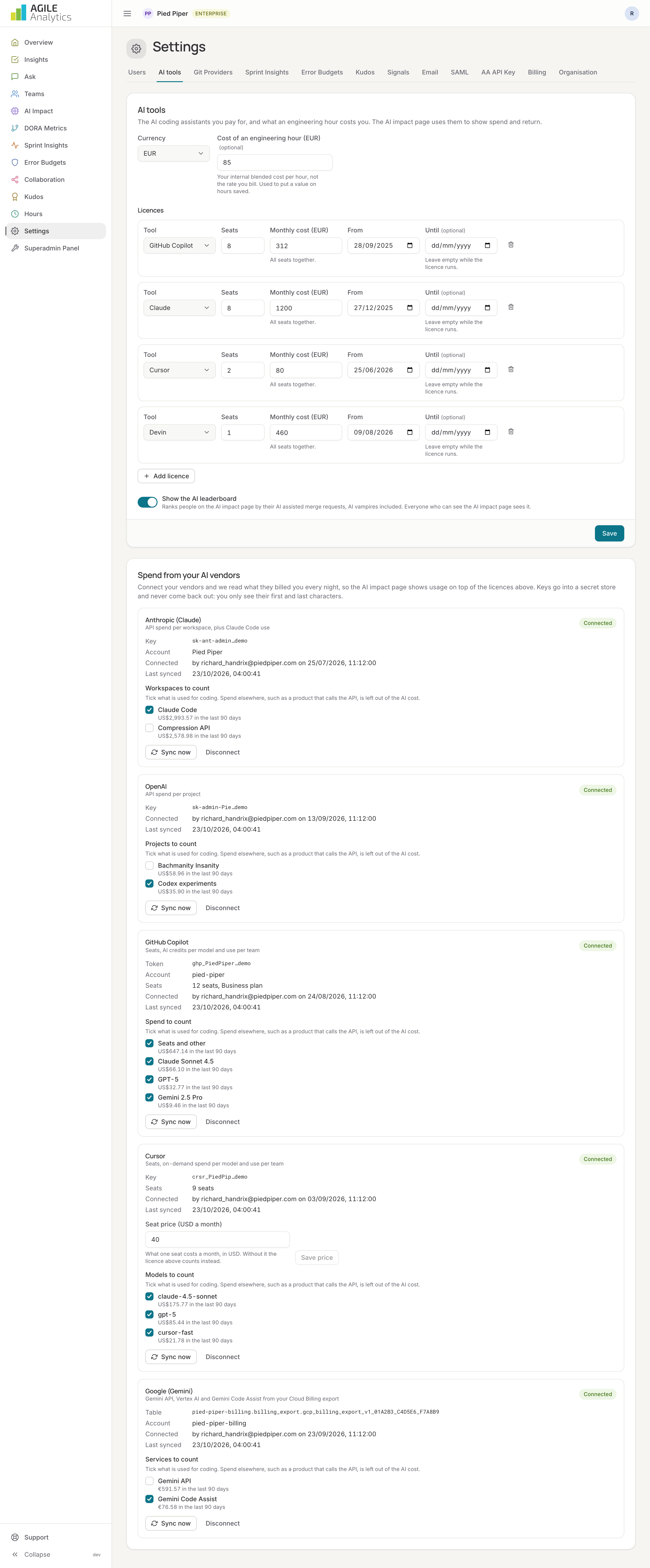
Keys go into a secret store and are never shown again; the page shows only a masked hint and the last sync. Vendor spend is part of the Enterprise plan.
Anthropic (Claude)
Reads API spend per workspace, plus Claude Code use (sessions, lines, commits, pull requests).
- In the Claude Console, open Settings → Admin keys and create an admin key. It starts with
sk-ant-admin. - In Agile Analytics, go to Settings → AI tools → Spend from your AI vendors, choose Anthropic and paste the key. Press Connect; Agile Analytics checks the key right away.
- Tick the workspaces to count: only the ones used for coding. Spend elsewhere, such as a product that calls the API, is left out of the AI cost.
Seat fees for Claude Pro, Team and Max are not in this API: keep those as licences.
OpenAI
Reads API spend per project.
- In the OpenAI platform, open Organization → Admin keys and create an admin key. It starts with
sk-admin-. - Paste it under Anthropic's neighbour, OpenAI, and press Connect.
- Tick the projects to count.
ChatGPT and Codex seats are not in this API: keep them as licences.
Google (Gemini)
A Gemini API key cannot read what was spent, so Agile Analytics reads your Cloud Billing export instead: Gemini API, Vertex AI and Gemini Code Assist.
- In the Google Cloud console, open Billing → Billing export and enable the standard usage cost export to BigQuery, if not done yet.
- Give Agile Analytics' service account (copy it from the page with Copy the service account) the BigQuery Data Viewer role on the export dataset, and BigQuery Job User on the project.
- Paste the full table name,
project.dataset.gcp_billing_export_v1_…, and press Connect. - Tick the services to count.
GitHub Copilot
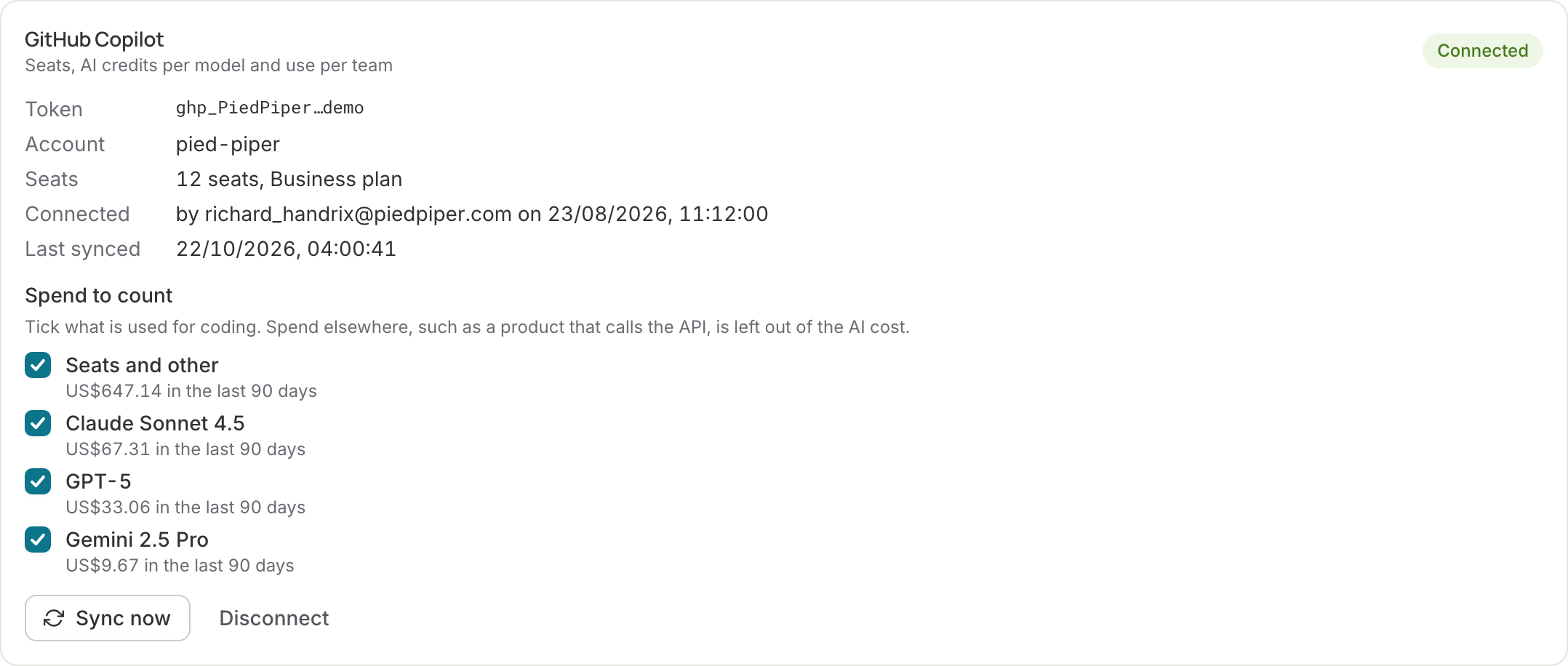
Reads the seats of one GitHub organisation, its Copilot bill (seats, plus AI credits per model) and Copilot use per day: completions shown and accepted, chat and agent requests, and lines added.
- As an organisation owner, create a classic personal access token with the scopes
read:organdmanage_billing:copilot. Fine-grained tokens cannot read the Copilot bill. - In the organisation's settings, open Copilot → Policies and switch on Copilot usage metrics. Without it GitHub writes no daily usage reports.
- In Agile Analytics, go to Settings → AI tools → Spend from your AI vendors → GitHub Copilot. Enter the organisation as it appears in its URL (github.com/
pied-piper), paste the token and press Connect.
On GitHub's enhanced billing platform, Agile Analytics reads the bill itself. Each day's Copilot bill is split into AI credits per model, plus the rest (the seats) as Seats and other. If the token cannot read the bill, or the organisation is not on enhanced billing yet, the card says so and the seats count at the plan's list price: $19 for Business, $39 for Enterprise. If you pay less, enter your own seat price on the card.
Copilot reports use per GitHub login, not per e-mail address. Logins are linked to people through their git accounts, the same way merge requests are.
Cursor
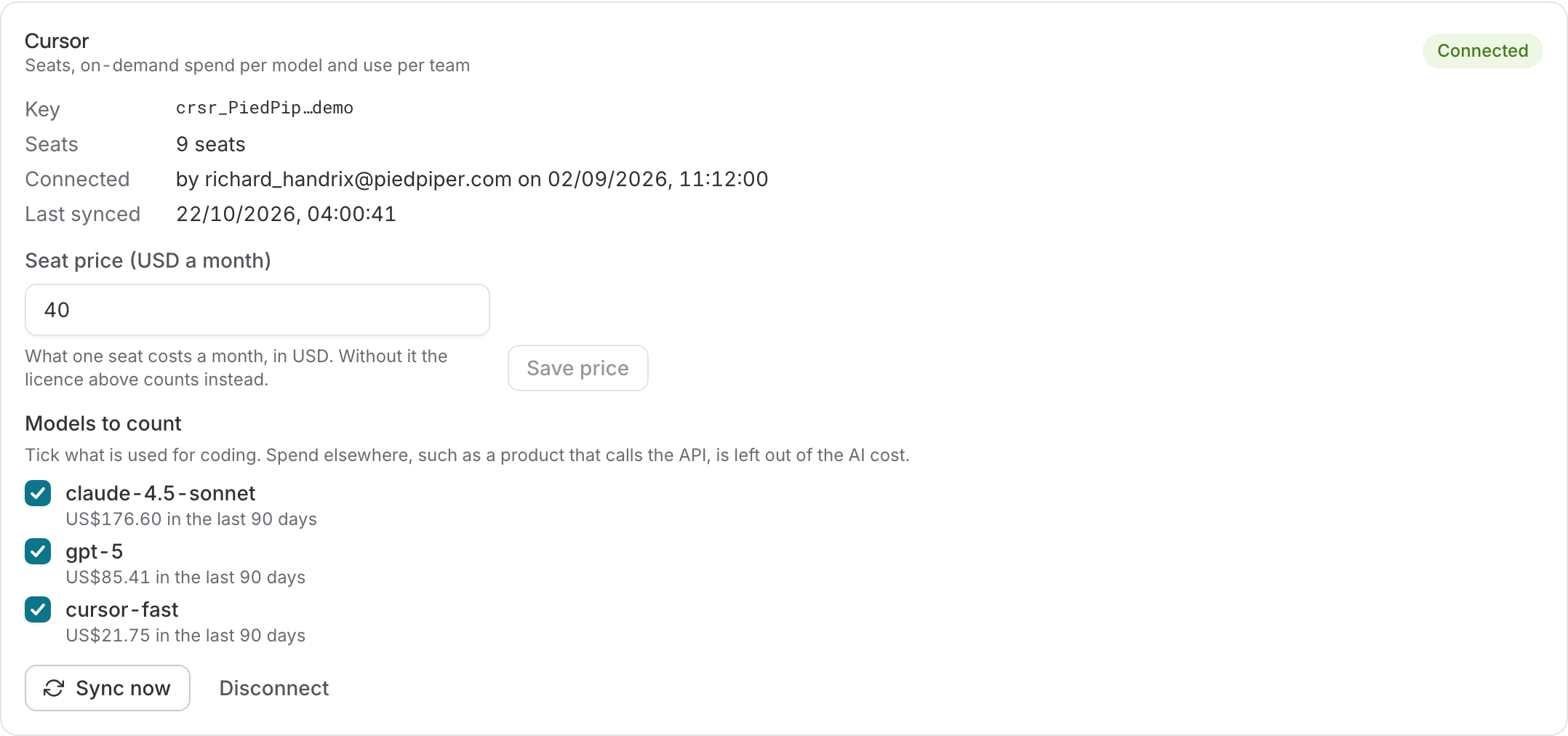
Reads the seats of a Cursor team (its members), on-demand spend per model, and Cursor use per day: Tab completions shown and accepted, chat, agent and composer requests, and lines accepted.
- As a team admin, open the Cursor dashboard → Settings → API keys and create an Admin API key.
- In Agile Analytics, go to Settings → AI tools → Spend from your AI vendors → Cursor. Paste the key and enter what you pay per seat per month in USD, for example 40. Press Connect.
Cursor's API reports usage, not seat fees, which is why it asks for the seat price; you can change it on the card later. Without a seat price the seats still count for seat use, but the licence you entered for Cursor keeps counting as its cost. Usage included in your plan is not billed and not counted; on-demand usage is.
After connecting
Each vendor card shows its status (connected, needs attention, not connected), who connected it and when, the last sync and the spend of the last 90 days per scope. Sync now runs the nightly read at once. Spend is stored in the vendor's currency and converted with the European Central Bank rate of the day; the AI impact page says so when a day is still waiting for its rate.
Disconnect destroys the key and stops the sync; tick Also delete the spend we synced to remove the data too. Revoke the key at the vendor as well if nothing else uses it.
Copilot and Cursor spend is read one day at a time. A newly connected vendor fills in its last 90 days over a few nights, newest first, and a rate limit at the vendor only pauses the sync until the next night.
Use per person stays private. Anthropic, GitHub Copilot and Cursor report use per person. Agile Analytics keeps those rows only to link vendor accounts to people and teams, and never shows them. An assistant's use only appears when at least five people used it in the period, and per team only for teams with at least five active members.