Documentation menu
AI impact
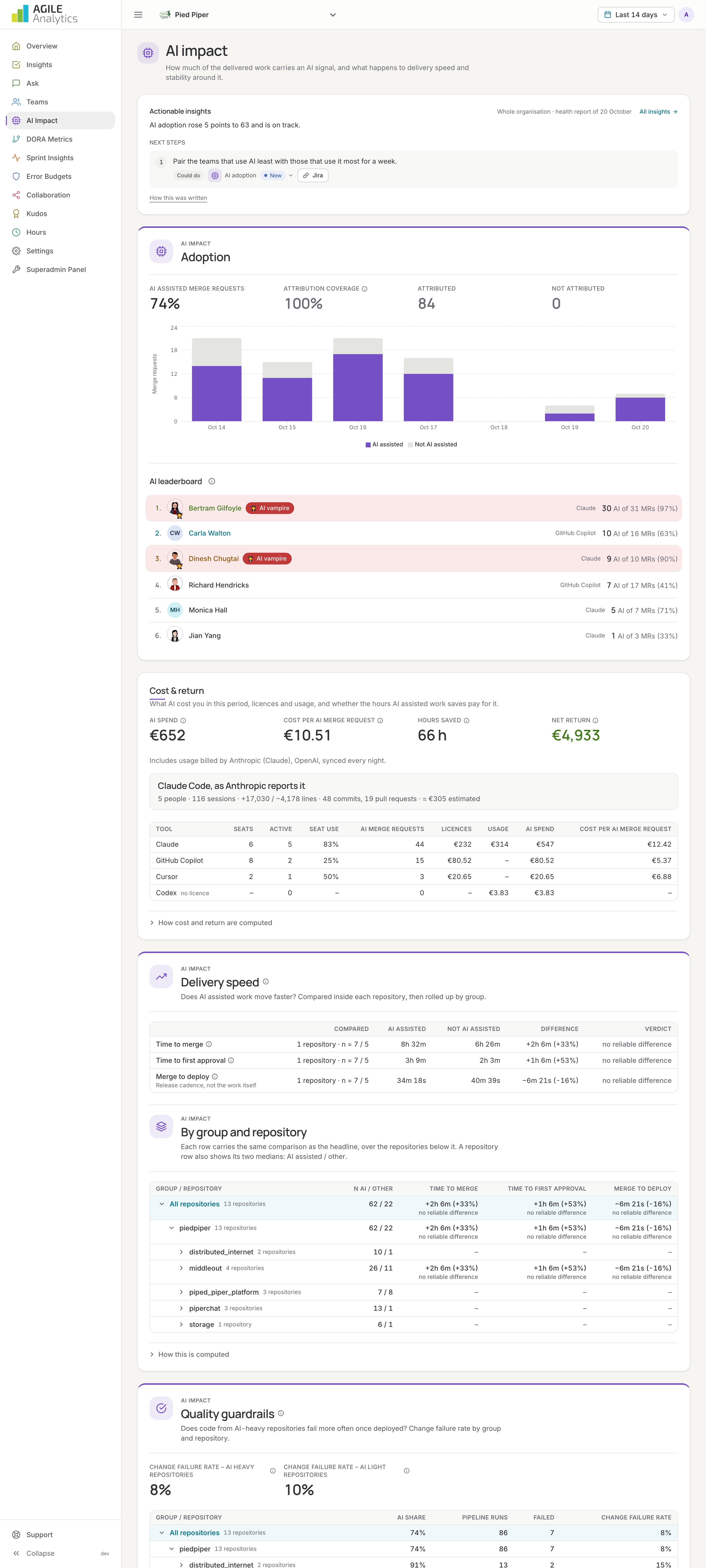
AI impact shows how much of your delivered work carries an AI signal, what happens to delivery speed and stability around it, what AI costs you and what it returns, and who leans on it most.
How AI work is recognised
AI coding assistants such as Claude Code, GitHub Copilot, Cursor, Codex, Gemini, Devin and Aider sign the commits they help write with a Co-authored-by trailer. Agile Analytics reads the commits of every merged merge request from your Git provider and marks the merge request as AI assisted when one of its commits names an assistant; the tool is recorded too. This happens within seconds of a merge, and a nightly job catches anything missed. Commits on any branch are read every hour as well, so people who push without a merge request are counted. Merge requests whose commits could not be read are not attributed and are left out of the shares.
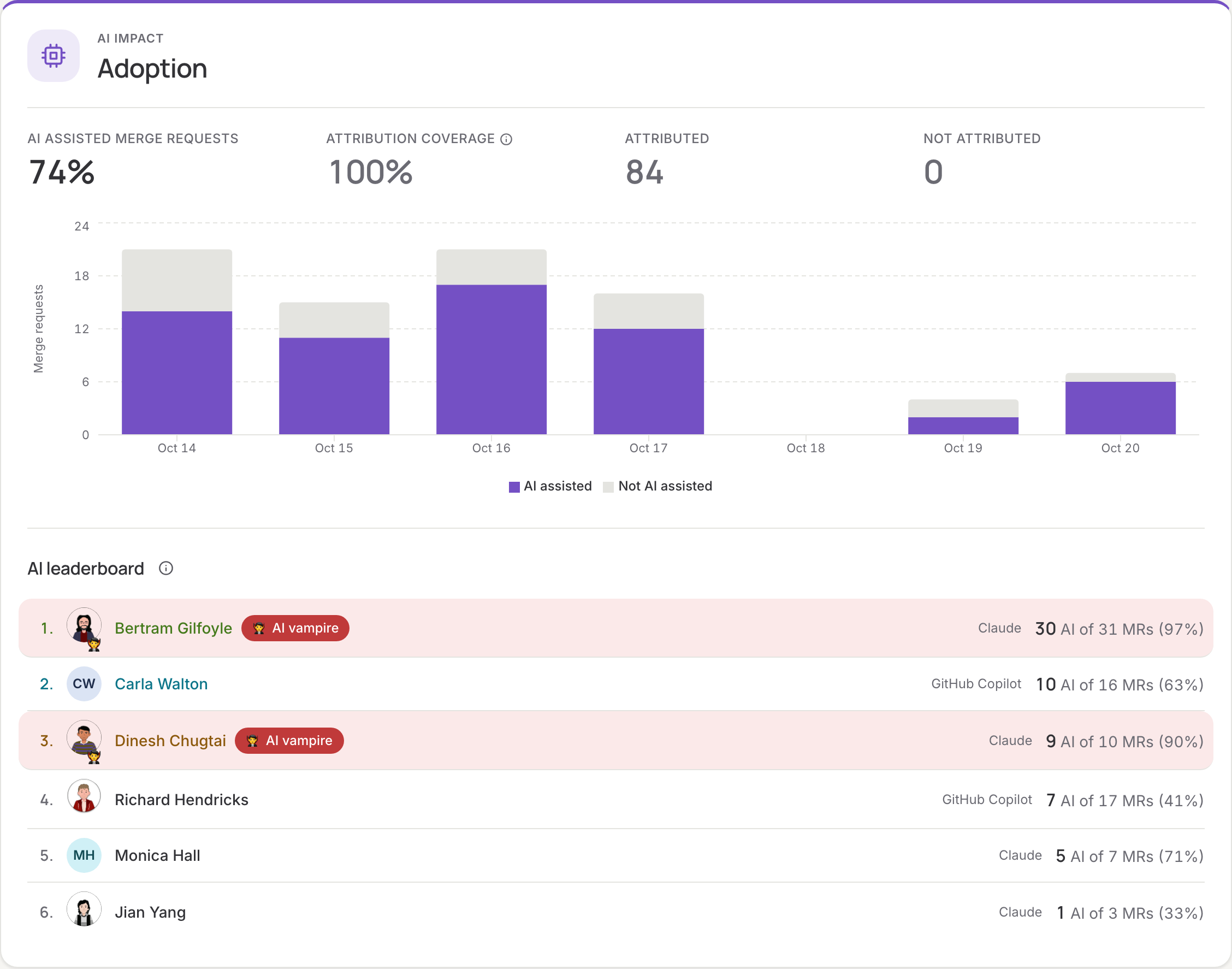
Adoption
The share of merged merge requests that were AI assisted in the period, next to the attribution coverage: the share of merge requests that could be attributed at all. Read the adoption rate against that number. A bar per day (per week for periods over two months) shows AI assisted, not AI assisted and not attributed merge requests, and a second figure counts AI co-authored commits. The table below splits adoption by group and repository.
Delivery speed
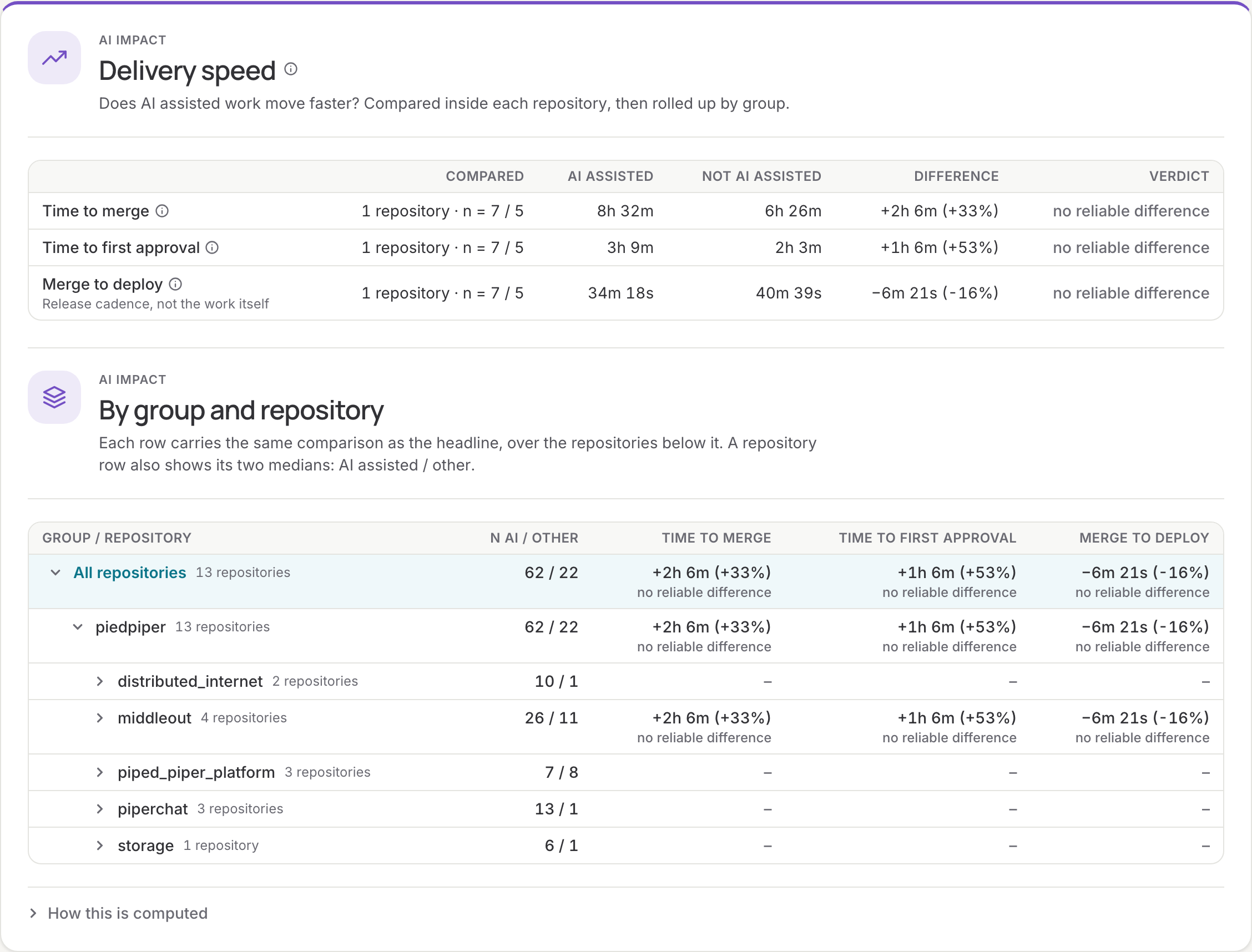
Does AI assisted work move faster? AI assisted and other merge requests are compared inside each repository, never across repositories: a repository that releases weekly makes every merge wait, whatever wrote the code. For each repository with enough merge requests in both groups, the page compares the median time to merge, time to first approval and merge to deploy, then rolls the differences up by group. The headline also shows time to first review (from opening the merge request to the first comment or approval by someone other than the author) and time in review (from that first review to the merge). A verdict (faster with AI, slower with AI, no reliable difference) is only given when the direction survives resampling the data.
Quality guardrails
Does code from AI-heavy repositories fail more often once deployed? Each repository gets the share of its attributed merge requests with an AI signal; above the threshold it counts as AI heavy. The change failure rate of AI heavy and AI light repositories is compared, with the same pipeline feed as the DORA page.
Rework
Does AI assisted work need more fixing afterwards? Two measures, for AI assisted and other changes side by side:
- Rework rate: the share of merged changes that a revert or hotfix had to follow within 14 days. A revert is a merge request titled
Revert "…", one that says it reverts merge request !N, or one from arevert-branch, and is linked to the change it names. A hotfix comes from ahotfix/branch or has hotfix in its title, and is linked to the change merged last before it in the same repository. The period is followed for 14 more days, so recent changes can still turn out reworked. - Changed after review: of the reviewed changes, the share with commits pushed after the first comment or approval by someone other than the author, and typically how much of their lines changed after it (review churn).
Each group needs at least five changes before a rate is shown. The reverts and hotfixes themselves are listed with the change they undo. Review churn is read from GitLab and Bitbucket at merge time and every night.
These are cohort comparisons, not a controlled experiment. AI assisted and other changes are not randomly assigned, so a difference here is a lead to investigate, not proof that AI caused it.
DORA over time
Deployment frequency, lead time for changes and change failure rate day by day (week by week for longer periods) for a group or repository, with the number of AI assisted and other merge requests merged over the same weeks. With a single repository selected, the chart also draws both groups' lead times.
Cost & return
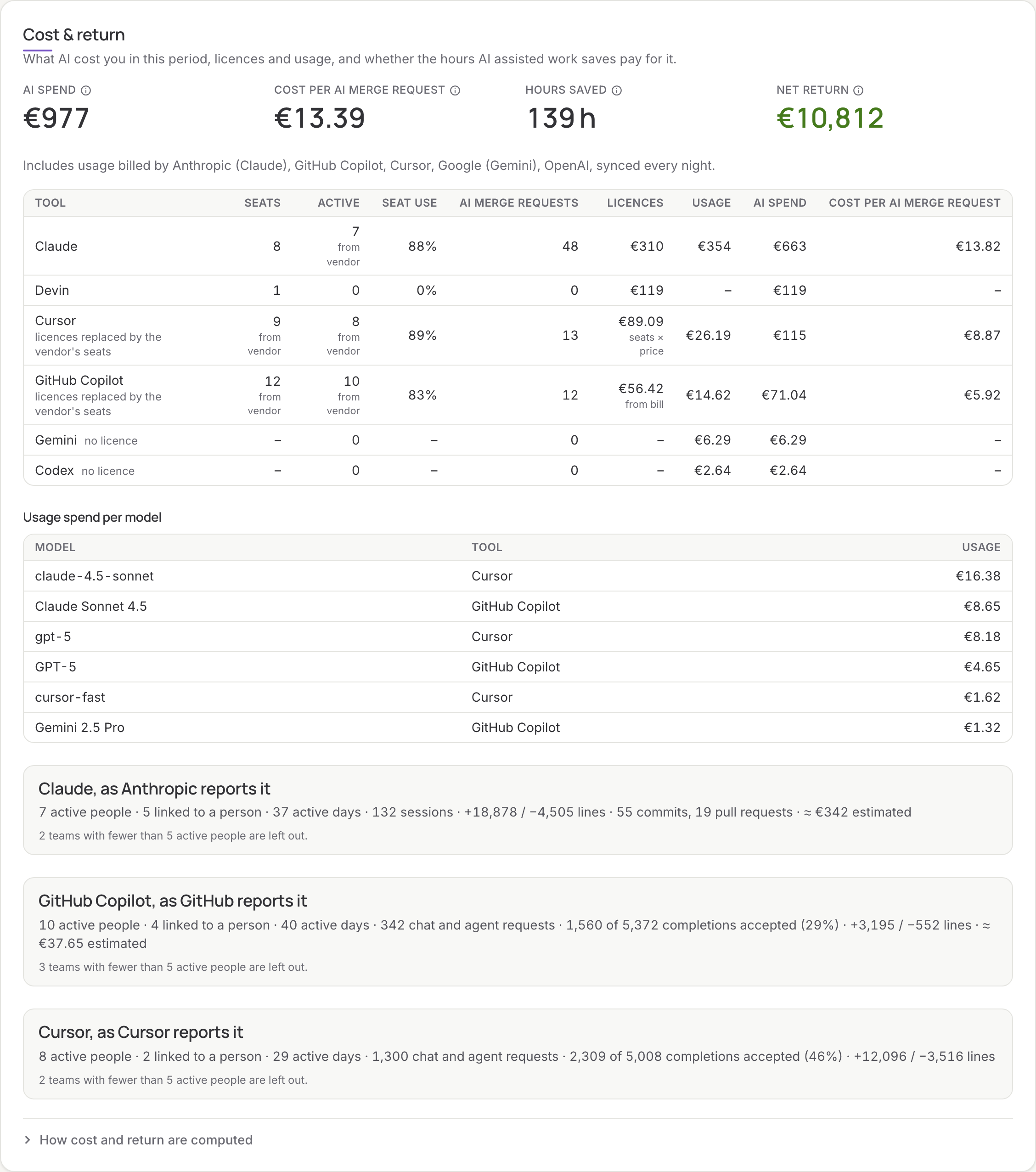
What AI cost you in the period, and whether the hours AI assisted work saves pay for it:
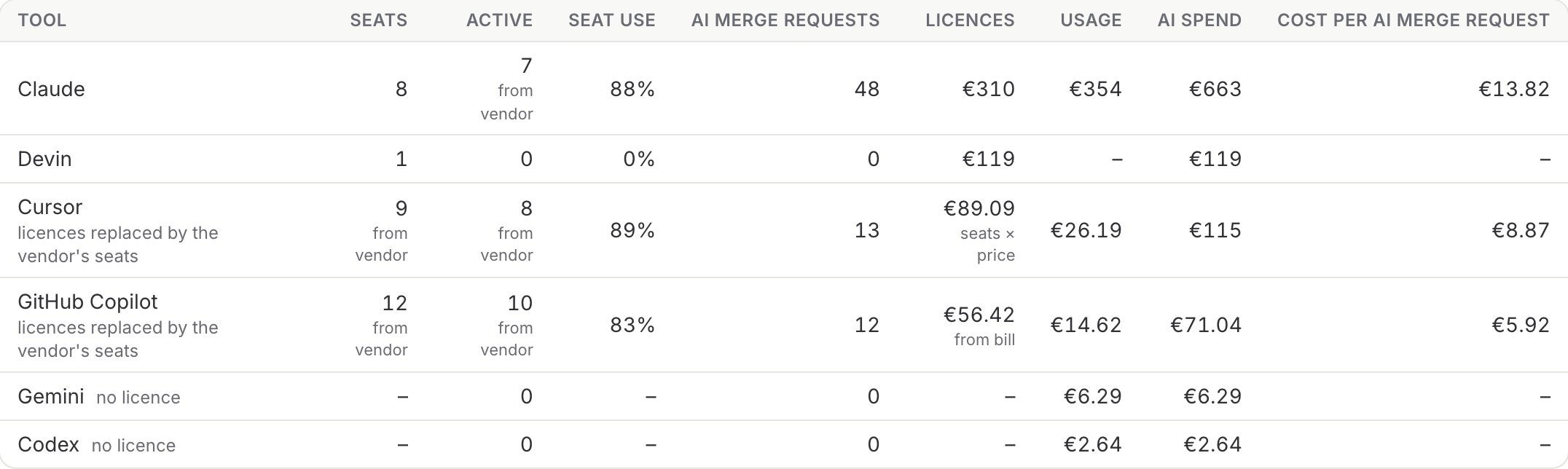
- AI spend: the licences from Settings → AI tools, spread over the days they ran, plus the usage billed by the vendors you connected (see Connect AI vendors), converted at the European Central Bank rate of the day.
- Cost per AI merge request: spend divided by the AI assisted merge requests merged in the period.
- Hours saved: the return is measured, not assumed. For everyone whose merge requests can be linked to their booked hours, each month with enough merged merge requests gives hours per merge request; months with a high AI share are compared with months with a low one. The difference, times the AI assisted merge requests in the period, is the hours saved. It is only valued when enough people take part and the direction survives resampling.
- Net return: hours saved times the cost of an engineering hour, minus the spend.
A table per tool shows seats, active people, seat use and AI merge requests, with the spend split into Licences (seat fees) and Usage (token and agent spend). For GitHub Copilot and Cursor the seats and active people come from the vendor, and seat use is the vendor's active users divided by its seats; for other tools, active means the people who merged AI assisted work made with it. When a vendor reports and prices its seats, the licence you entered for that tool no longer counts, and the table says licences replaced by the vendor's seats.
Usage spend per model lists what the vendors billed per model where they report it (Copilot AI credits, Cursor).
Below that, every assistant whose vendor reports its use (Claude Code, GitHub Copilot, Cursor) gets a summary for the organisation: active people and how many of them are linked to a person, active days, sessions or requests, completions accepted, lines, and the vendor's estimated cost. Teams with at least five active members get a row each, with their share of the usage spend by active days. Nothing is shown per person, and an assistant used by fewer than five people in the period shows no numbers at all. How cost and return are computed on the page spells out the method with your own numbers.
Where each number comes from
Small labels under the numbers say where they come from:
| Label | Means |
|---|---|
| (none) | Entered by you under Settings → AI tools |
| from vendor | Reported by a connected vendor (seats, active people) |
| from bill | Seat fees read from the vendor's bill (Copilot on GitHub's enhanced billing) |
| seats × price | The vendor's seats times the seat price you entered (Cursor) |
| list price | The vendor's seats at its list price, because its bill could not be read (Copilot) |
AI merge requests always come from the Co-authored-by trailers in commits (see How AI work is recognised above). Usage is always what the vendor billed.
AI leaderboard
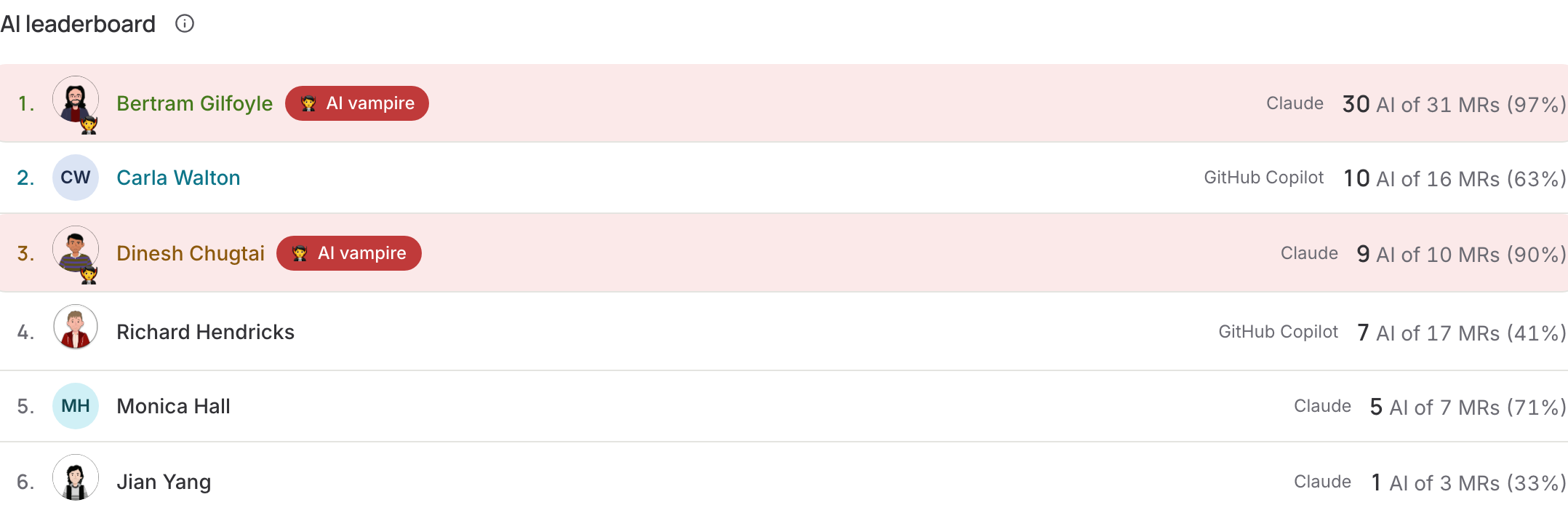
Everyone who merged something in the period, ranked by their AI assisted merge requests, with the share of their work that carried an AI signal and their AI co-authored commits. Click a name to see those merge requests, each linked to its Git provider. An AI vampire works with AI on nearly everything, at more than a handful of AI assisted merges a week: impressive, but a signal to get some sleep. Admins can switch the leaderboard off under Settings → AI tools.
Where AI impact is used
- AI adoption, one of the eight health areas, with full marks at 50% AI assisted merge requests. With an AI adoption target under Settings → Targets, the adoption panel shows whether it is met.
- The AI adoption tile on the overview, the weekly e-mail and the assistant.
AI impact is part of the Scale-Up and Enterprise plans; the leaderboard and vendor spend are Enterprise. See Plans.